.svg)
Three focused steps. Zero jargon. Backed by Zynoraq Basis consultants, the same team enterprises trust for licensing, rollouts and 24×7 support.
The guide
Each step includes what to click, what to expect, and a checkpoint so you always know you're on the right track.
Download SAP HANA STUDIO
Step 1 of 4
Unzip the SAP HANA STUDIO installer, then launch SetupAll.exe as administrator.
Download the file from above given link on top right.
.avif)
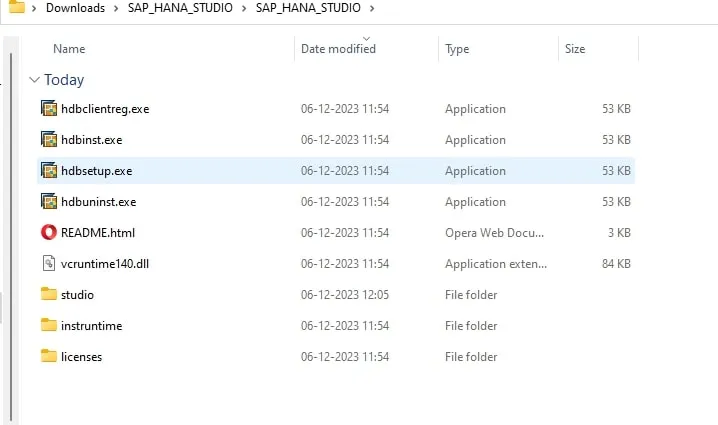
Once the file has been downloaded, unzip and extract its contents from the downloaded folder.
Now, access the extracted folder and double click on the “HDBSETUP” file, as shown in below screenshot.
Stuck at login?
We provision ready-to-use SAP user accounts within 24 hours — perfect for practice, training and demos.
Step 2 of 3
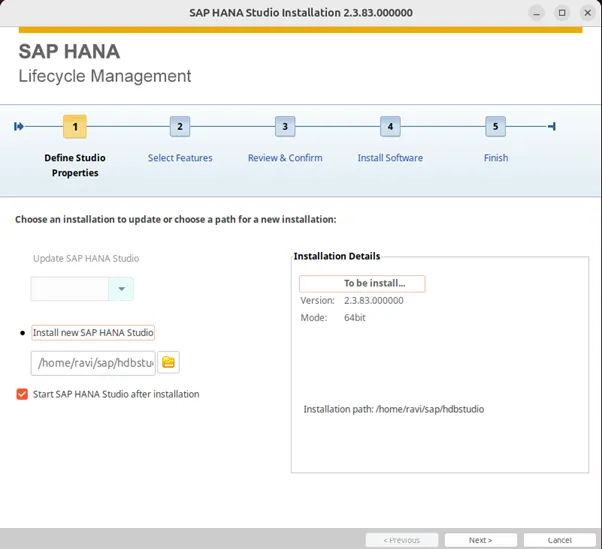
Pick the components you want the installer to lay down.
Now click on the “NEXT”
Now click on the “INSTALL”
Click Finish and restart your machine if prompted.
No system yet?
We spin up dedicated SAP demo systems in hours, ready for connection testing.
This short walkthrough covers the same three steps end to end extracting the installer, running setup, and configuring your first SAP Logon Pad connection so you can follow along at your own pace.
Get access to a live SAP server to start practicing right away.
Get SAP server access →
Enterprise-grade SAP consulting, digital infrastructure, and Industrial IoT solutions for global organizations.
.avif)
.avif)


.png)
.png)